14 Dec 2024


We’re thrilled to announce that PHP 8.0 is now available on Hostinger servers. This PHP version comes with new features and changes to provide the best possible performance for your web projects.
Since this is a major update, we encourage all users migrating to the latest release to get familiar with the new changes which we will cover in this article.
Why Do You Need PHP 8.0?
The latest benchmark tests by Phoronix show that PHP 8.0 is performing 10% better than its predecessors. This data suggests a promising future for PHP-based websites and applications.
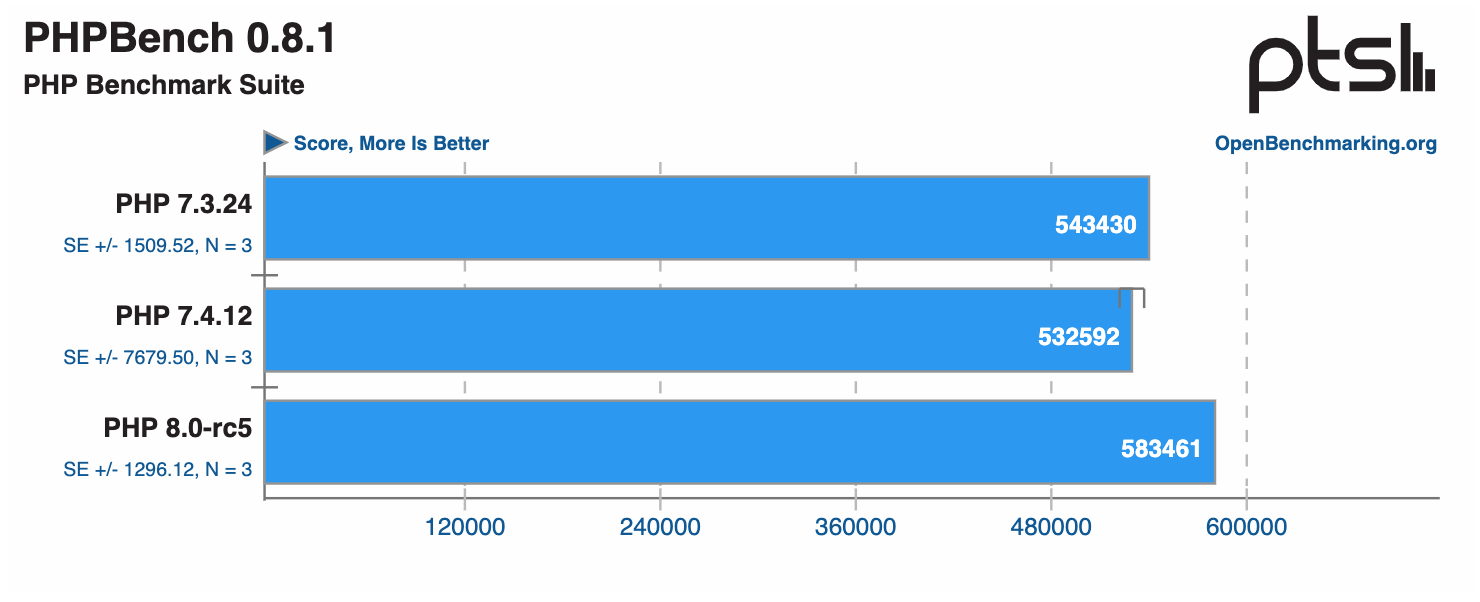
Better yet, the test was not even conducted using the JIT compiler, a new optimization feature introduced with PHP 8.0. Developers can expect a much faster performance if it is enabled.
Furthermore, the 8.0 version implements new features to make coding much quicker and cleaner, reducing plenty of boilerplate and redundant code.
Since this is a version update, your website will likely experience changes that might break it if you transition to PHP 8.0 without making any prior modifications. To help prepare for the migration, we will walk you through all the newest features.
Changing Your PHP Version
Hostinger clients can follow these steps to update their PHP version:
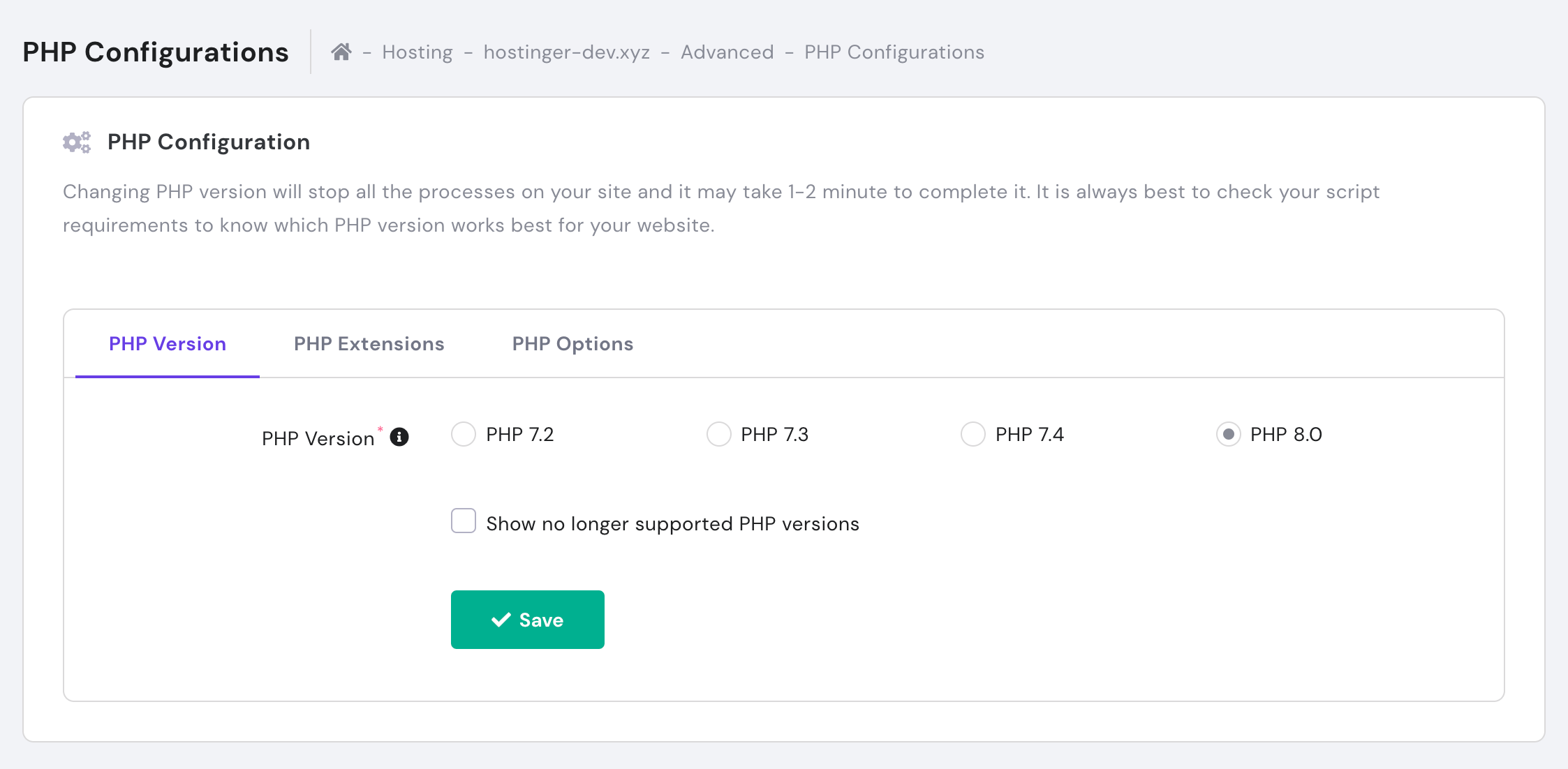
Note that the update may take a couple of minutes to complete and cause your website to be temporarily unavailable.
What’s New in PHP 8.0
There are plenty of quality-of-life changes coming with the new update alongside plenty of brand-new features. Let’s explore what’s new and what’s changing in PHP 8.0.
JIT (Just-in-Time) Compiler
The JIT compiler is one of the most exciting updates of PHP 8.0. This feature aims to work with opcache to improve performance in script execution.
What Is JIT?
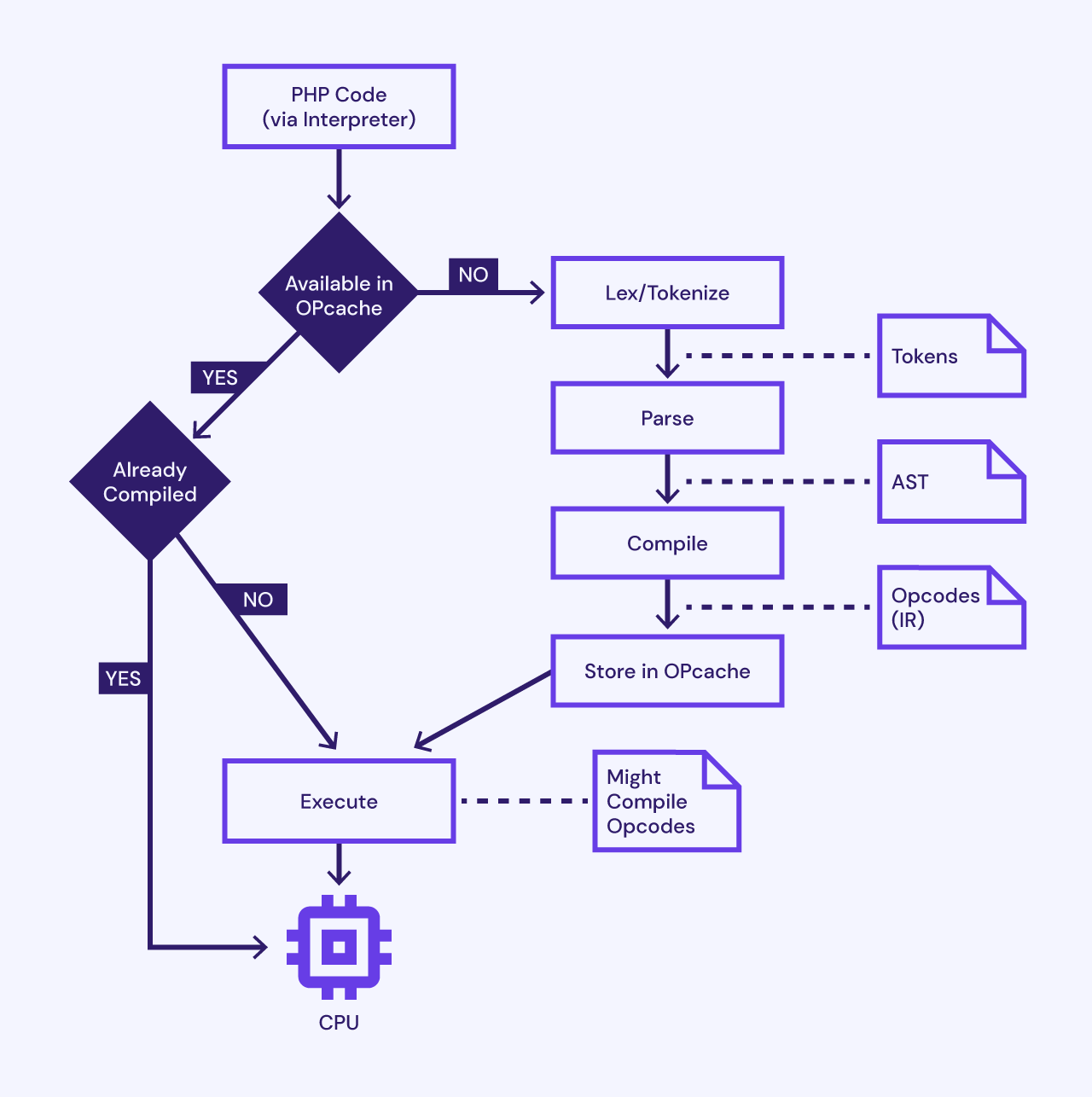
Short for just-in-time, JIT compiles opcode into machine code right before it’s run for output. To understand what that means and how it works, we need to understand the PHP script execution stages:
This process uses a significant amount of server resources, especially if a PHP script gets repeat requests.
That’s why PHP 5.5 introduced the opcache extension, which stores the opcode from the compilation stage.
When the server receives a new request for the same script, the interpreter can immediately run the opcode from the opcache. That way, there’s no need to restart the execution process from the beginning.
PHP 7.4 added a preloading feature several years later to have the opcache precompile scripts into opcode during startup. As a result, the interpreter can immediately deliver the opcode for execution when the server first receives a request for the script.
Despite these perks, there are several downsides. One is that towards the end of the process, the Zend VM still needs to convert the opcode into machine code before running it, which can take significant time and resources.
That’s where the JIT compiler comes in. It will compile the opcode into machine code during its first run to prepare for the next execution.
When there is a request for a JIT-compiled script, PHP will run it directly by the CPU instead of the Zend VM, resulting in faster performance. Here’s what the script execution stages will look like on PHP 8.0, in comparison to the previous version:
There are two JIT compilation engines:
What Does JIT Mean for Me?
According to the RFC, enabling JIT is the most significant way to improve PHP performance. Skipping this feature may result in you missing out on a major benefit.
Thankfully, recent tests show that the JIT compiler has been able to enhance the script execution process – mainly if you use the Tracing engine.
PHP’s synthetic benchmarks revealed a three-time larger boost in speed after enabling the Tracing mode. In long-running applications, you can expect to see a performance improvement by up to two times.
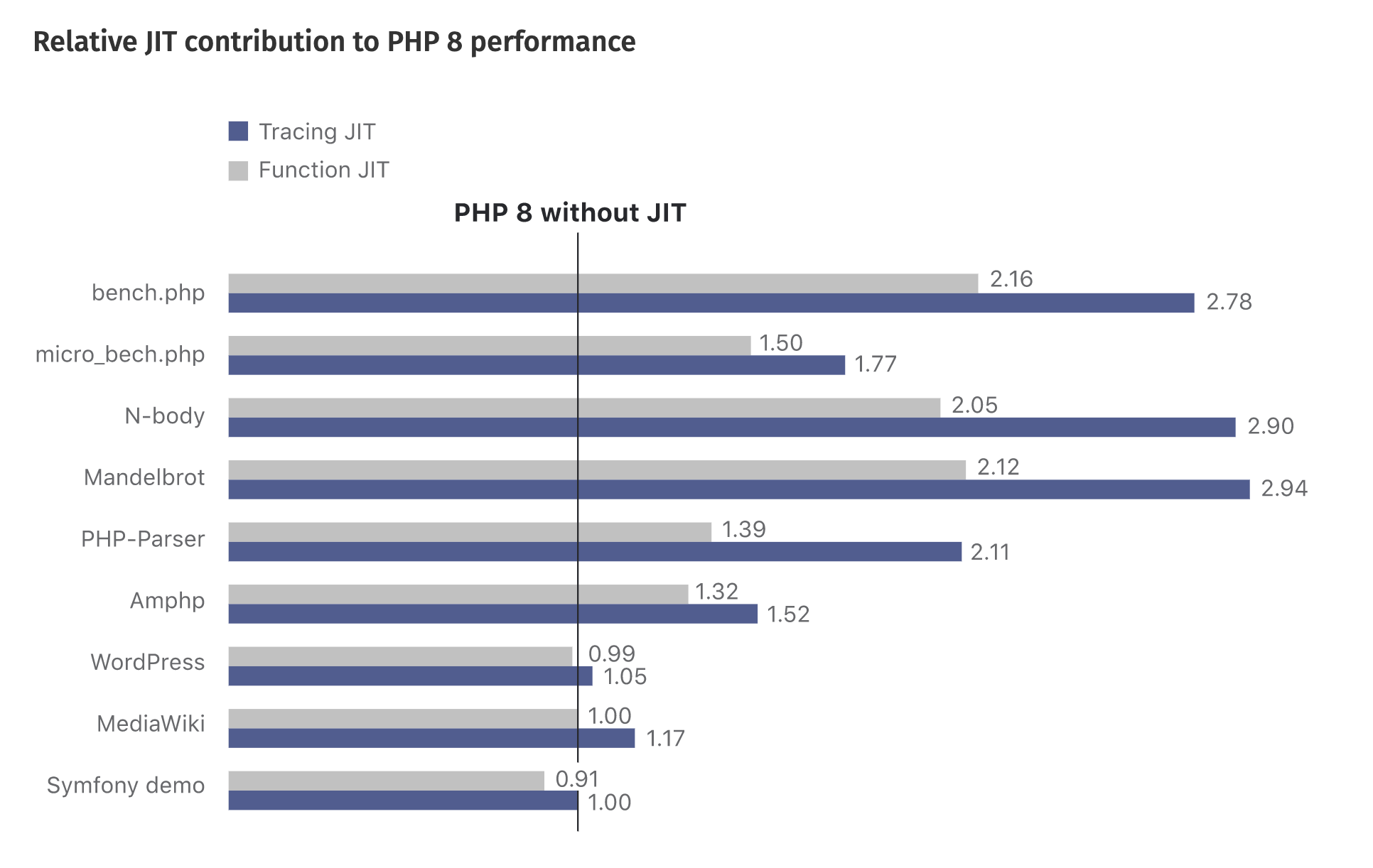
For WordPress users and developers, the JIT compiler can add a slight boost as well, though it may not be as significant.
You will need to reduce the TTFB, optimize the database, and lower the number of HTTP requests to get the best possible performance. That said, PHP developers will continue their improvement efforts by using profiling and speculative optimizations.
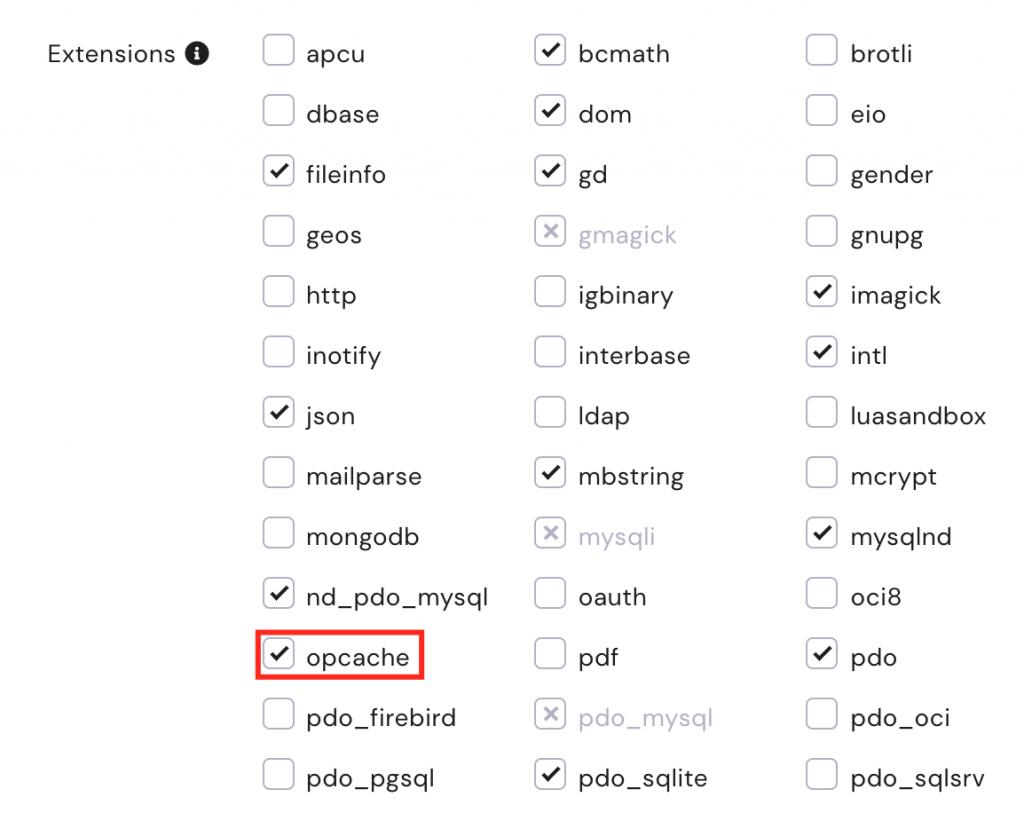
If you want to enable JIT, ensure that the opcache extension is active.
Shared Hosting plan clients can do this by opening the Hosting Account dashboard - PHP Configuration. On the PHP Extensions tab, make sure to tick the opcache box.
 New Features in PHP 8.0
There are tons of exciting features besides JIT. This section will provide an overview of the major additions and changes to PHP 8.0.
Minor New Features
Here are some minor additional features you can expect in PHP 8.0:
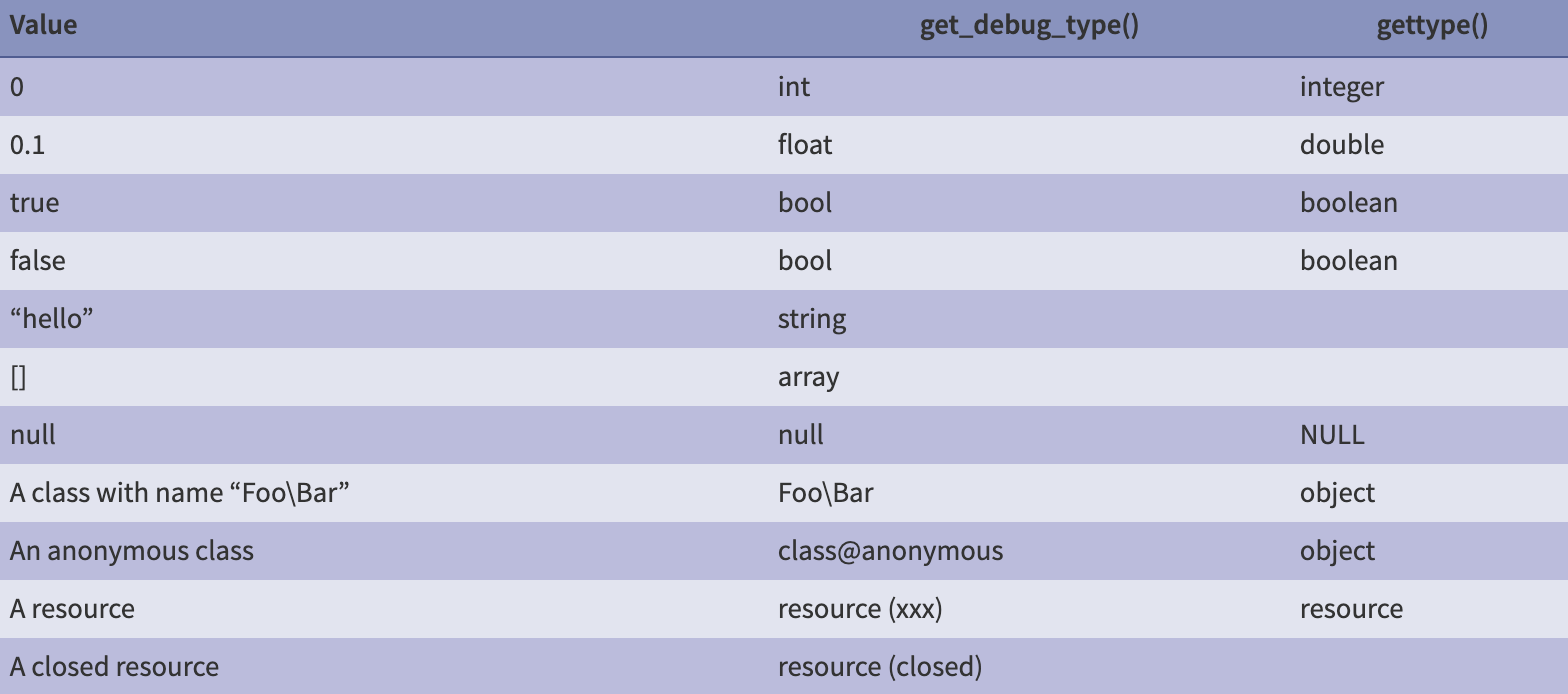
Deprecated Features in PHP 8.0
PHP 8.0 will deprecate the following features:
Check out this resource for more information about the deprecated features.
Backward Incompatible Changes for PHP 8.0
The migration to PHP 8.0 brings many changes that are incompatible with older PHP versions. Some of them include:
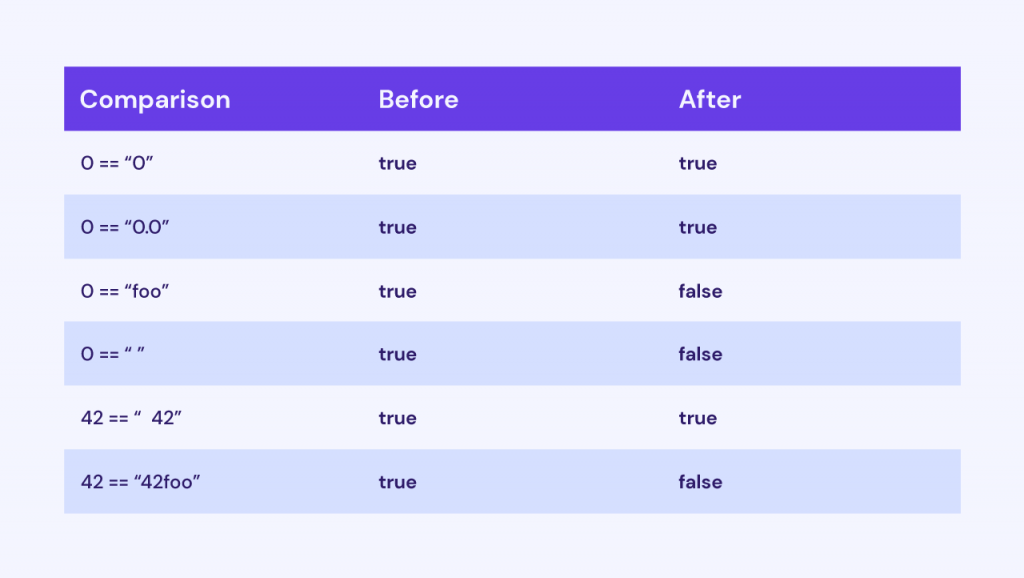
Make sure to read the official documentation to see other backward-incompatible changes.
Other PHP 8.0 Changes
The changes below won’t result in backward incompatibility, but they are still essential to note. Some of them include:
This resource contains more information about the changes.
WordPress and PHP 8.0
WordPress 5.6 and upwards is compatible with PHP 8.0. The development team has removed many deprecated features to achieve this.
However, they cannot claim full compatibility as many plugins and themes may not support PHP 8.0 yet. If you want to make a switch to PHP 8.0, ensure you can make the transition without any issues. Otherwise, if you’re working with a professional web developer, ask them to help you with the transition.
If you’re a plugin or theme developer, WordPress encourages adapting your product’s code to the new PHP version. That way, the plugin or theme’s users won’t experience problems on their website should they update the software.
This article has outlined the major changes that may apply to WordPress developers. That said, we recommend reading this WordPress announcement to see which ones you should pay special attention to.
Remember that you can always downgrade your version to PHP 7.4 if there are too many issues to resolve.
Conclusion
PHP 8.0 has some exciting changes and improvements for PHP developers, like the JIT compiler, constructor property promotion, and weak maps. Expect to see a boost in website performance and code-writing experience.
Make sure to check out the RFCs and documentation so that your projects can be fully compatible with the latest PHP version. Good luck!


14 Dec 2024

Get the updates, offers, tips and enhance your page building experience
Up to Top